
Overview
When you provide context or corrections during your conversations, Julius can permanently store those insights to improve future interactions. This happens automatically when you include helpful details in your natural language prompts.How Feedback Learning Works
As you interact with your data, you naturally provide context that helps Julius understand your schema better. Comments like “the customer_id field actually refers to our B2B accounts” or “we use ‘active’ status to mean currently subscribed” contain valuable business logic that isn’t captured in your raw schema. Julius captures this feedback and evaluates whether it should become part of your learned schema knowledge. However, not all feedback makes it into storage—Julius validates the information before committing it.The Validation Process
Before storing user-provided information, Julius runs a validation check: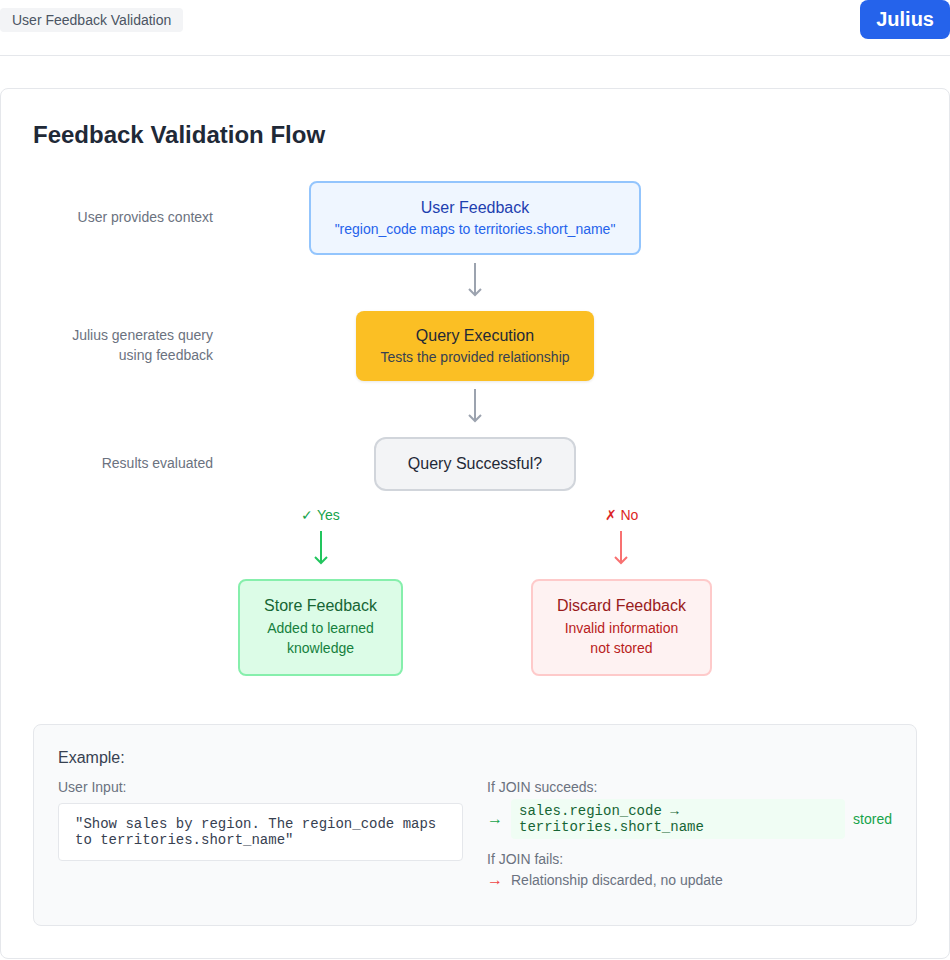 Feedback Captured: When you provide context in your prompt, Julius notes this as potential schema knowledge.
Query Execution: Julius generates and executes the query based on your feedback.
Result Validation: If the query succeeds and returns expected results, the feedback is validated.
Conditional Storage:
Feedback Captured: When you provide context in your prompt, Julius notes this as potential schema knowledge.
Query Execution: Julius generates and executes the query based on your feedback.
Result Validation: If the query succeeds and returns expected results, the feedback is validated.
Conditional Storage:
- If the tool call succeeds: The feedback is stored as learned information
- If the tool call fails or returns errors: The feedback is discarded
Example Scenario
User prompt: “Show me sales by region. By the way, the region_code in our sales table maps to the short_name field in territories, not the id.” What happens:- Julius captures the relationship hint:
sales.region_code→territories.short_name - Julius generates a query using this relationship
- If the query executes successfully → The relationship is stored
- If the query fails (e.g., join produces no results or errors) → The relationship is not stored